Switch to new Dynamic Views



by Fábio Souza & Eduardo Rodrigues
Introduction
We know. It’s been a looooooong time again. But once you read this post, we are quite sure you’ll be happy we took the time to write it. And it’s also our very first post officially signed by 2 authors. As they say: two heads think better than one.Recently, we’ve been challenged with the task of setting up an internal “production” environment intended to run and support some internal applications. As part of this challenge, we were required to somehow integrate this environment with our company’s LDAP and SSO solutions. Since this was the first time we were facing those requirements, we started to do a lot of research (googling) on the topics involved. For our great surprise (well... not really), we could not find one single place or document that would give us a birds-eye view in an objective and consolidated form. We did find multiple blogs and documents scattered throughout the Net, each one talking about different pieces. But we had to do all the hard work of filtering, refining and compiling all this data, discarding all wrong/outdated information while keeping only what’s really relevant, correct and up-to-date. And believe me when I say... it’s a lot of information!
That’s the motivation behind this post. Share the final outcome of this research with readers, in the form of a “step-by-step” guide, so that nobody should need to go through all the hassle again.
So, let’s cut to the chase.
Environment Scheme
This diagram tries to give a nice overview of all the pieces involved in this post.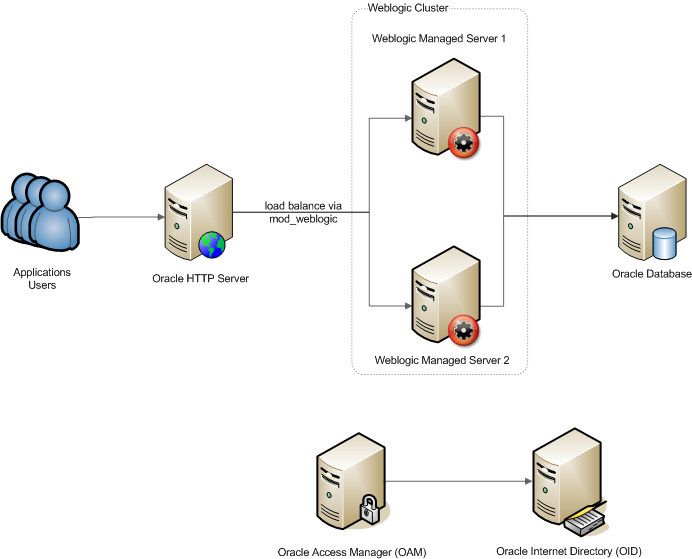
Access Flow with SSO

SSO Configuration
This section describes the steps to integrate the existing environment with the selected SSO Solution. In this example, the SSO solution is based on the following products:- Oracle Access Manager (OAM)
Provides access control services with centralized authentication, policy-based authorizations, and auditing with rich identity administration functionality such as delegated administration and workflows. It protects resources at the point of access, delegating authentication and authorization decisions to a central authority. - Oracle Internet Directory (OID)
This is our Identity Store and plays the role of our LDAP server at the same time. This is where all users are authenticated against and their security profiles are fetched from. - Oracle Weblogic Server (WLS) with these security providers
- Oracle SSO Assertion Provider
This component does the mapping between the SSO-authenticated user and his/her identity in the identity store (OID in our case) - OID Authentication Provider
This component is responsible for the communication between Weblogic and the OID server. It is able of authenticating users against OID and also of creating its JAAS security context, which will be used by JavaEE applications. Because our objective here is to integrate with SSO, this particular component will not be responsible for authentication but for the creation of security contexts only. - Oracle HTTP Server (OHS) with these modules
- weblogic_module
This OHS module does the bridge between OHS and Weblogic for specified locations (URIs). It's also capable of mapping multiple Weblogic nodes (cluster) and performing simple but handy Round Robin load balancing. - mod_osso
This module is designed to work with both Oracle SSO and OAM. Based on a configured set of protected locations (URIs) it can identify when a user needs to be authenticated and then redirect the user to the SSO login page and then back to the originally requested URL.
Configuring weblogic_module
This module is usually installed and loaded out-of-the-box with OHS. It can be manually configured in file$ORACLE_INSTANCE/config/$COMPONENT_TYPE/$COMPONENT_NAME/mod_wl_ohs.conf. Bellow is a sample:
LoadModule weblogic_module "${ORACLE_HOME}/ohs/modules/mod_wl_ohs.so"


# This empty block is needed to save mod_wl related configuration from EM to this file when changes are made at the Base Virtual Host Level

<IfModule weblogic_module=>

     # list all nodes in our Weblogic cluster

     WebLogicCluster mynode1:80,mynode2:80

     # log/debug options
     # Debug ON
     # WLLogFile /tmp/weblogic.log

</ifmodule>


<Location /myapp>

     SetHandler weblogic-handler

</Location>
As you can imagine, the setup above will take care of redirecting all requests coming in OHS under /myapp to one of the nodes in our Weblogic cluster.
Configuring mod_osso
You'll need to create an intermediate text file called osso.txt with the properties bellow. All values will have to be obtained from your OAM/SSO administrator, based on the URL being protected:
sso_server_version =

cipher_key =

site_id =

site_token =

login_url =

logout_url =

cancel_url =

sso_timeout_cookie_name =

sso_timeout_cookie_key =
Encrypt (obfuscate) file osso.txt into file osso.conf by running the following command (don’t forget to include “root” at the end):
$ORACLE_HOME/ohs/bin/iasobf osso.txt osso.conf rootIn file
$ORACLE_INSTANCE/config/$COMPONENT_TYPE/$COMPONENT_NAME/httpd.conf under the include section there is a commented line including mod_osso.conf. Uncomment this line so that the include takes effect. Here is an example of what that line looks like:# Include the configuration files needed for mod_osso
include "${ORACLE_INSTANCE}/config/${COMPONENT_TYPE}/${COMPONENT_NAME}/mod_osso.conf"
Go to $ORACLE_INSTANCE/config/$COMPONENT_TYPE/$COMPONENT_NAME and copy file mod_osso.conf from subfolder "disabled" and then edit the file like this:
LoadModule osso_module $ORACLE_HOME/ohs/modules/mod_osso.so


<IfModule mod_osso.c>


# In this example we are not using SSL, thats why OssoSecureCookies  is off

OssoSecureCookies off

OssoIdleTimeout off


# OssoIpCheck should be set to off when protected resources are accessed via proxies or VPNs

OssoIpCheck on

# make sure file osso.conf is in the same directory as mod_osso.conf

OssoConfigFile osso.conf


# Location is the URI you want to protect.

# /myapp is set here just as an example.

# you must set your own

<Location /myapp>

   Require valid-user

  AuthType Osso

</Location>


</IfModule>
And don't forget to restart OHS! :)
| If the mods are messing up the interception of requests, it might be a good idea to have the Include statement for mod_osso.conf come before the one for mod_wl_ohs.conf in httpd.conf so the mods will intercept the requests in the correct order. Unpredictable errors may occur if URLs that must be interpreted by mod_osso are being intercepted by the mod_wl_ohs first. |
Creating the SSO Assertion Provider in your Weblogic Domain
- Open the Weblogic Console application
- Go to Security Realms > myrealm > Providers
- Select New under the Authentication Providers table
- Give a name for the new provider, select its type, and click OK. For example:
Name: OSSO Identity Asserter
Type: OSSOIdentityAsserter - Click OK
- Click on the name of the newly added provider
- In the Common tab, set the appropriate values for common parameters and set the Control Flag to OPTIONAL and then save the settings
Creating the Oracle Internet Directory Authentication Provider
The OID Authentication Provider creation is pretty simple. You just need to fill up a form with the LDAP server info (there are tons of how-tos in sites and blogs about it). The tricky part is to put it to work with an ADF application when you are not using the default “username attribute”. OK, I will translate that. Imagine that in your company “mail” is the LDAP attribute used to authenticate an user. Normally you would just need to configure the “User Name Attribute” in the OID Authentication Provider configuration screen with value “mail” but that alone won’t be enough for ADF to be aware of this change. To make it work, you must properly configure the file jps-config.xml that’s being used by your Weblogic domain, which will most likely be located in <domain_path>/config/fmwconfig. You’ll need to modify this file with something like:
(...)

<serviceInstance name="idstore.ldap" provider="idstore.ldap.provider">

   <property name="idstore.config.provider" value="oracle.security.jps.wls.internal.idstore.WlsLdapIdStoreConfigProvider"/>

   <property name="CONNECTION_POOL_CLASS" value="oracle.security.idm.providers.stdldap.JNDIPool"/>

   <!-- The lines below define which attribute will be used as username -->

   <property name="username.attr" value="mail"/>

   <property name="user.login.attr" value="mail"/>

</serviceInstance>

(...)
Since we’re very nice guys and our intention is make readers’ life easier, we’ve created a wlst script that should do most of the work automatically: create the Authentication Provider and configure the jps-config.xml. It can be found here and instructions may be found in comments inside the file.
Reviewing Authentication Providers in Weblogic
- Oracle SSO Asserter: set as the first one in the providers list and set its Control Flag to "Optional"
- OID Authentication Provider: set as the second one and set its Control Flag to "Sufficient"
- Weblogic's DefaultAuthenticator: set as the third one and set its Control Flag set to "Optional"
- Weblogic's DefaultIdentityAsserter: must be the last one in the providers list
The idea here is to guarantee that Oracle SSO Asserter and OID Authentication providers are triggered in the right order, before any other provider. The User/Role API in ADF is able to query data from only one provider. Oracle Platform Security Services (OPSS) initializes the identity store service with the LDAP authenticator chosen from the list of configured LDAP authenticators according with the following algorithm:
- Consider the subset of LDAP authenticators configured. Note that, since the context is assumed to contain at least one LDAP authenticator, this subset won't be empty.
- Within this subset, keep only the providers configured with the higher control flag. The flag ordering is: REQUIRED > REQUISITE > SUFFICIENT > OPTIONAL
- Within the remaining subset, keep only the first provider configured in the context.
Configuring the Application to work with SSO
Independently of which products you are using to enable SSO in your environment, you still have to configure your application to use this infrastructure. In our example we are using OAM + mod_osso, but what this section covers can be used in any environment using a Weblogic Server with the following items:- Application Development Framework (ADF) Runtime installed (for installation, check this link)
- Authentication Provider
- Identity Asserter
Enabling ADF Security
- In JDeveloper, select "Application > Secure > Config ADF Security"
- Select "ADF Authentication and Authorization" and click on finish.
ADF Security uses jazn-data.xml to setup application authorization (or security policies). Follow the guideline below to configure it:
- Create Entitlements to define access for a group of resources. For example, "Basic Access" entitlement could include "view" permission on every page/taskflow that regular authenticated users can see.
- Create application roles to group users by access level. For example: "Application Users" could group all users that are granted with "Basic Access" entitlement. "Application Administrators" could group only those users granted with "Basic Access" and "Admin Section" entitlements.
- Create Enterprise Roles that correspond 1:1 with LDAP groups and then associate them with your application roles. For example: Enterprise Role with name = "VP's Org" could be mapped to application role "Application Users".
<!-- Using wildcards to configure resources -->

<resources>

   <resource>

      <name>oracle.appbuild.teamcal.pageDefs.*</name>

      <display-name>All Pages</display-name>

      <description>oracle.appbuild.teamcal.pageDefs.*</description>

      <type-name-ref>RegionResourceType</type-name-ref>

   </resource>

   <resource>

      <name>/WEB-INF/.*</name>

      <display-name>All Task Flows</display-name>

      <description>/WEB-INF/.*</description>

      <type-name-ref>TaskFlowResourceType</type-name-ref>

   </resource>

</resources>
Using the Weblogic Identity Store
When we started looking for the best approach to use the JavaEE container's Identity Store, we’ve found this example:
import oracle.security.idm.IdentityStore;

import oracle.security.idm.UserProfile;

import oracle.security.jps.JpsContext;

import oracle.security.jps.JpsContextFactory;

import oracle.security.jps.service.idstore.IdentityStoreService;


// THIS IS JUST AN EXAMPLE, WE ARE NOT CONSIDERING PERFORMANCE AND THREAD SAFETY ISSUES.

private UserProfile findUserProfile(String username) throws Exception {

   JpsContextFactory ctxFactory = JpsContextFactory.getContextFactory();

   JpsContext ctx = ctxFactory.getContext();

   IdentityStoreService idstoreService = ctx.getServiceInstance(IdentityStoreService.class);

   identityStore = idstoreService.getIdmStore();

   UserProfile userProfile = identityStore.searchUser(username).getUserProfile();

}
Even though this approach works fine, it is completely tied to the underlying security implementation (JPS in our case). Fortunately, we were able to find a more elegant and easy way to achieve the same thing, using only ADF APIs:
import oracle.adf.share.security.identitymanagement.AttributeFilter;

import oracle.adf.share.security.identitymanagement.UserManager;

import oracle.security.idm.UserProfile;


// THIS IS JUST AN EXAMPLE, WE ARE NOT CONSIDERING PERFORMANCE AND THREAD SAFETY ISSUES.

private UserProfile findUserProfile(String username) {

   // UserManager is automatically configured to use the container's Identity Provider and it is not thread-safe

   UserManager userManager = new UserManager();

   AttributeFilter[] filter = { new AttributeFilter("USER_ID", username) };

   ArrayList userProfiles = userManager.getUserProfileList(1, filter);

   UserProfile userProfile = (UserProfile)userProfiles.get(0);


   return userProfile;

}
Configuring Logout
In our environment, using OAM + mod_osso, the application would have to execute a well defined procedure to perform a proper single sign-off. Thankfully, ADF can take care of all logout details by itself. Using ADF this task becomes transparent to the application. There are two ways to implement the logout:- Using adfAuthentication servlet
- Call
/adfAuthentication with the following parameters:
logout: must be "true"
end_url: URL where the browser will be redirected to after the logout - Programatically
import oracle.adf.share.security.AuthenticationService;

import oracle.adf.share.security.authentication.AuthenticationServiceUtil;

(...)

AuthenticationService service = AuthenticationServiceUtil.getAuthenticationService();

String logoutURL = "/face/home/jspx"; // the end_url

service.logout(logoutURL, null);

(...)
Deploying the SSO-protected Application
When you deploy an application using JDeveloper Application's default settings, many things are done automatically such as database connections deployment and credentials update. This is fine when you are making local tests, but when you want to deploy to production server the situation changes. In our environment we already have a system-level DataSource setup in Weblogic for our application to use. We also have an identity store that contains all users and groups that we need. That said, our deployment is configured as follows:- Inside Application Properties, go to Deployment > Weblogic
- Inside “Security Deployment Options”, select "Update weblogic-application.xml with the following..."
- Check the box "Application Policies" (this will make all security policies configured in your jazn-data.xml migrates to the application server)
- Uncheck "Credentials" (this will prevent the copy of your local cwallet.sso to the application server)
- Uncheck "Users and Groups" (we are using the identity store already configured in WLS, there is no need to upload any local users and groups)
- Uncheck "Auto Generate and Synchronize WebLogic JDBC Descriptors During Deployment" (the DataSource is already configured in the Weblogic so there is no need to deploy a new one)
(...)

<login-config>

   <auth-method>CLIENT-CERT</auth-method>

</login-config>

(...)
 | When you have a database connection in your project and you deploy your application with box "Auto Generate and Synchronize WebLogic JDBC Descriptors During Deployment" checked, a datasource named “<db_connection_name>DS” will be deployed together with your application. |
Reference
OAM Home PageOID Home Page
Application Development Runtime
Article about User/Role API
Article about OPSS Artifacts
OID Configuration WLST Script